Overview
In MuleSoft, flow controls act like the decision-makers of an integration flow. They decide how and where a message should move inside a flow, based on rules, conditions, or execution behavior.
Whenever a request enters a Mule flow, a few important decisions need to be made:
Should the request continue or stop?
Should it be sent to one path or multiple paths?
Should the flow try another path if one fails?
Should requests be distributed evenly across systems?
All these decisions are handled by flow controls.
Flow controls examine the message and control the execution path, but they do not modify the message content themselves. Instead, they guide the message through the most suitable route, helping build integrations that are efficient, fault-tolerant, and scalable.
Flow Control in Mule
- Choice Router
Used when you want to choose between different paths based on conditions. Mule evaluates the incoming data and routes the message through only one matching path.
If no condition matches, the message can be sent to a default route. - First Successful
Used when you have multiple ways to perform the same task and want Mule to stop as soon as one option succeeds.
Mule tries each route one by one. As soon as a route completes successfully, it stops processing the remaining routes.
Try option A first. If it fails, try option B. If that works, stop.
- Round Robin
The Round Robin router works like a fair dispatcher. It distributes messages across multiple paths in a circular, sequential order.
Unlike the Choice router, it doesn’t look at message content. It simply remembers the last path used and sends the next message to the next path.
- Scatter-Gather
Used when you need to send the same message to multiple systems in parallel and then collect all responses.
Mule scatters the request to different routes simultaneously and gathers all responses into a single result.
Think of it as asking the same question to multiple people at once and waiting for everyone to reply.
Choice Router Implementation
Create a Mule project with name Router and add a Mule configuration file with name ‘choice-router‘.
- Drag an HTTP Listener into the flow.
- Configure the listener path as
/choice-router. - Create a new HTTP Listener configuration with host
0.0.0.0and port8081. - Drag a Choice Router after the HTTP Listener.
- Set the
whenexpression to#[attributes.queryParams.name != null]. - Inside the
whenroute, add a Logger component. - Configure the logger message to log the query param name(========= My name is #[attributes.queryParams.name] ===========).
- Add a Transform Message component after the logger in the
whenroute and add below dw code.%dw 2.0 output application/json --- { "message": "My name is " ++ (attributes.queryParams.name default "") } - Inside the
Defaultroute, add a Logger component. - Configure the logger message to indicate the default route execution(============= Default route is selected =============).
- Add a Transform Message component in the
Defaultroute beside the logger and add below dw code.%dw 2.0 output application/json --- { "message" : "name is missing in request query parameters so the default route is selected" } - Save all changes.
Once the code is developed your Mule flow should look like below.
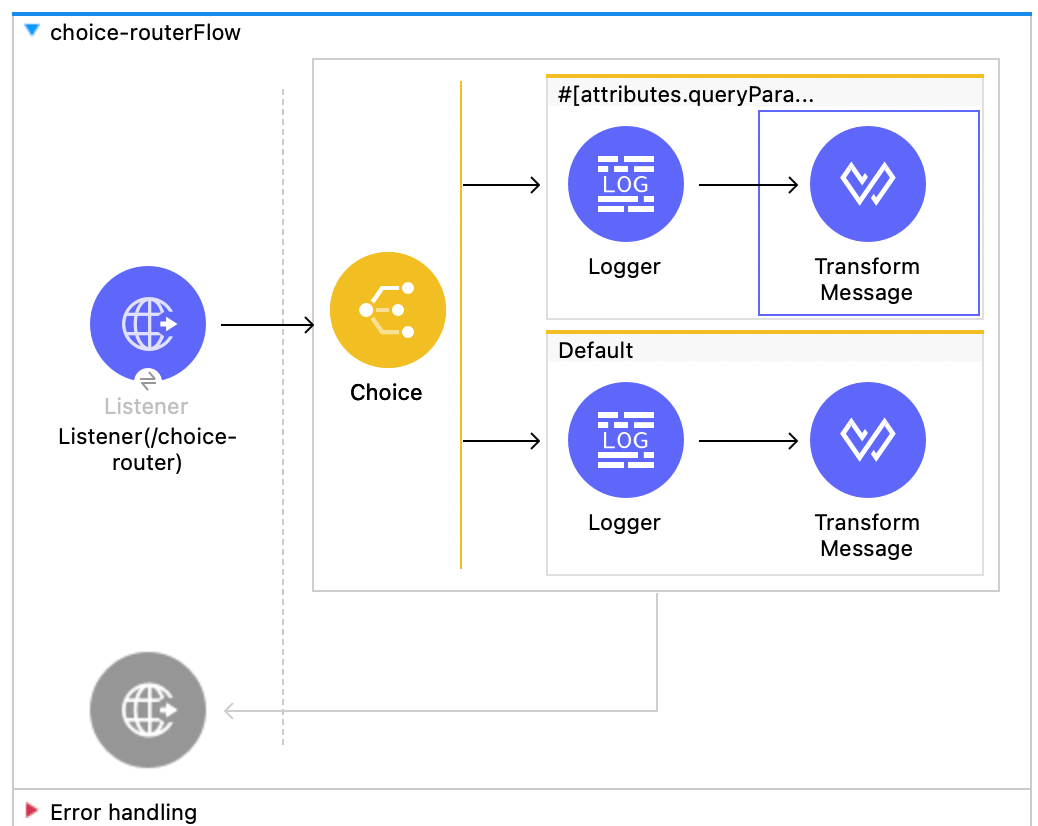
If you are still stuck in any issue then import below xml into your choice-router mule configuration file.
<?xml version="1.0" encoding="UTF-8"?>

<mule xmlns:ee="http://www.mulesoft.org/schema/mule/ee/core" xmlns:http="http://www.mulesoft.org/schema/mule/http"
	xmlns="http://www.mulesoft.org/schema/mule/core"
	xmlns:doc="http://www.mulesoft.org/schema/mule/documentation" xmlns:xsi="http://www.w3.org/2001/XMLSchema-instance" xsi:schemaLocation="http://www.mulesoft.org/schema/mule/core http://www.mulesoft.org/schema/mule/core/current/mule.xsd
http://www.mulesoft.org/schema/mule/http http://www.mulesoft.org/schema/mule/http/current/mule-http.xsd
http://www.mulesoft.org/schema/mule/ee/core http://www.mulesoft.org/schema/mule/ee/core/current/mule-ee.xsd">
	<flow name="choice-routerFlow" doc:id="597d6d1d-7c47-4a3d-b10d-47e8d2f83424" >
		<http:listener doc:name="Listener(/choice-router)" doc:id="4d8f7180-665b-4100-9738-ca63ff3c5a8e" config-ref="HTTP_Listener_config" path="/choice-router"/>
		<choice doc:name="Choice" doc:id="f141d6c1-5832-4f98-bb2b-97ed9244f0b1" >
			<when expression="#[attributes.queryParams.name != null]">
				<logger level="INFO" doc:name="Logger" doc:id="5606e4e9-c0ea-4176-999a-7cddbc5179da" message="========= My name is #[attributes.queryParams.name] ==========="/>
				<ee:transform doc:name="Transform Message" doc:id="a45a132a-e09d-45c1-b78b-6e5cc74fd430" >
					<ee:message >
						<ee:set-payload ><![CDATA[%dw 2.0
output application/json
---
{
  "message": "My name is " ++ (attributes.queryParams.name default "")
}]]></ee:set-payload>
					</ee:message>
				</ee:transform>
			</when>
			<otherwise >
				<logger level="INFO" doc:name="Logger" doc:id="c9d71767-e108-4e7c-8de2-466a7e1fb202" message="============= Default route is selected ============="/>
				<ee:transform doc:name="Transform Message" doc:id="db60465e-10ed-4d7b-8b51-e8d23da21dd6" >
					<ee:message >
						<ee:set-payload ><![CDATA[%dw 2.0
output application/json
---
{
	"message" : "name is missing in request query parameters so the default route is selected"
}]]></ee:set-payload>
					</ee:message>
				</ee:transform>
			</otherwise>
		</choice>
	</flow>
</mule>
Testing :
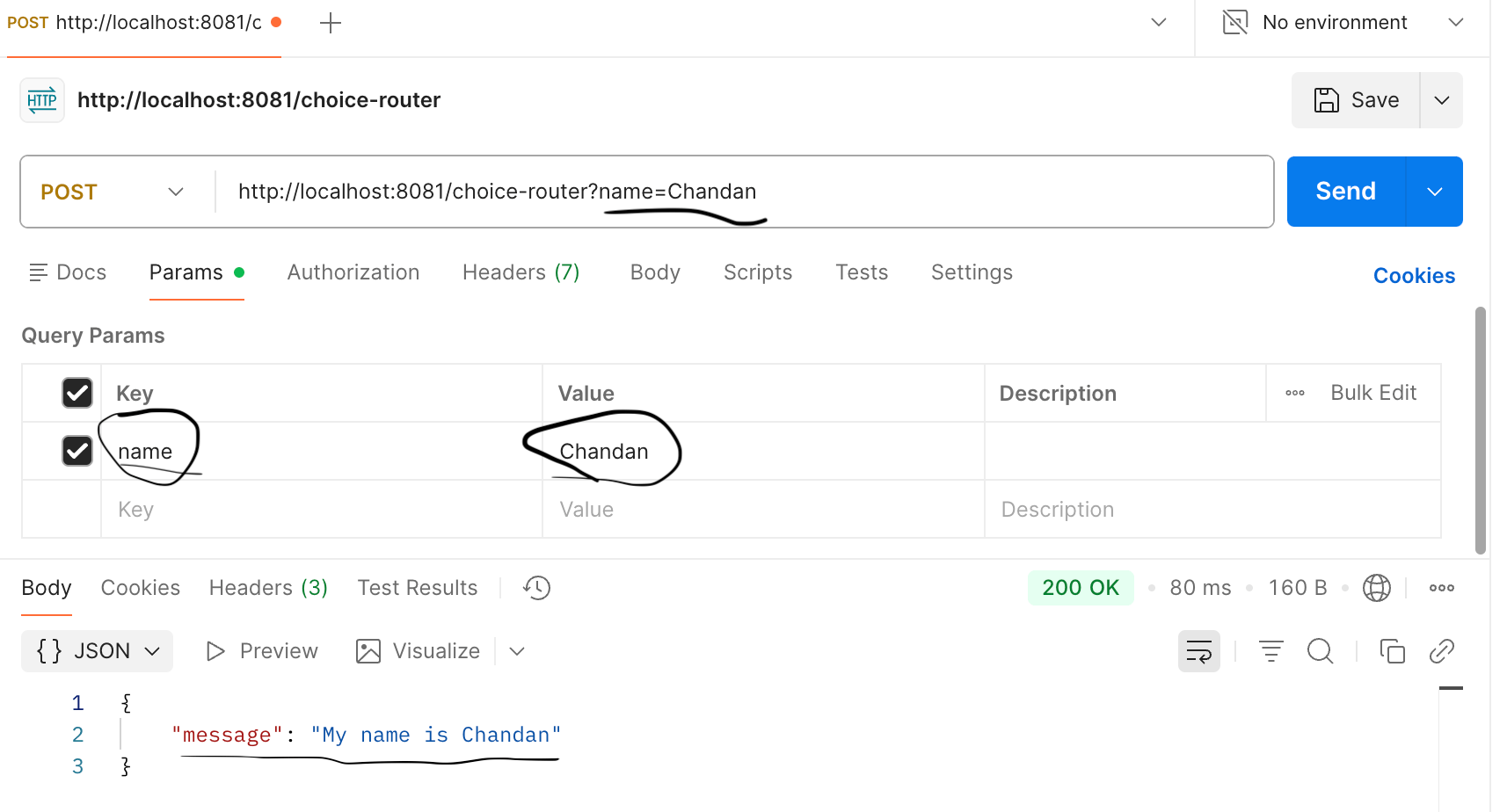
Run the Choice Router Mule configuration file. Once it is deployed, invoke the endpoint http://localhost:8081/choice-router without providing the name parameter.You will see that the default route is selected.
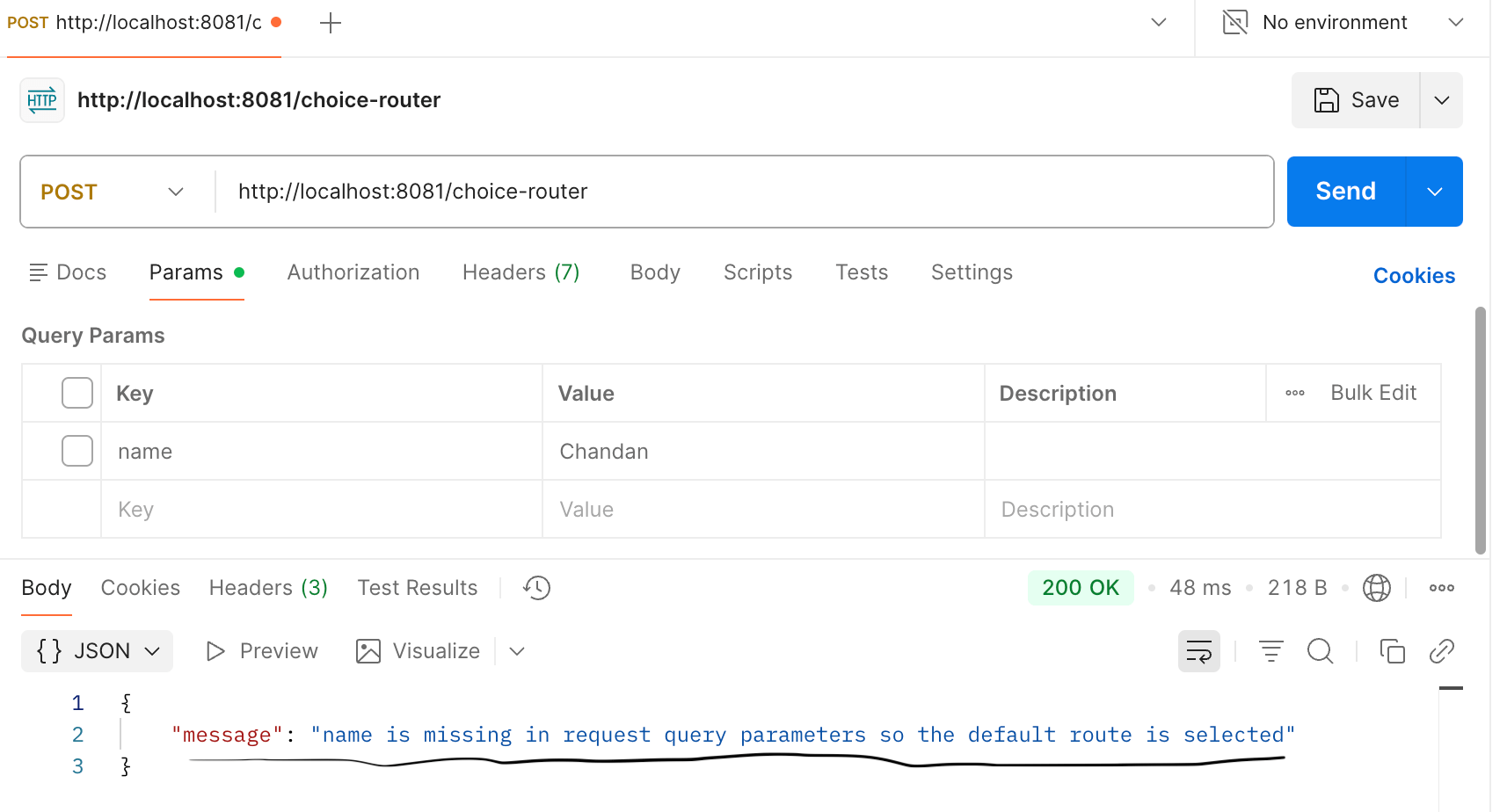
Now call the same endpoint with the name parameter. You will see the name printed in the response, which confirms that the when block in the Mule application was executed successfully.
First Successful Implementation
- Create another mule configuration file with name first-successfull.
- Drag an HTTP Listener component into the flow.
- Set the listener path to
/first-successfull. - Create or select an HTTP Listener configuration with host
0.0.0.0and port8081. - Drag a First Successful after the HTTP Listener.
- Place a Transform Message component inside the First Successful route as first route.
- Set the payload to return a JSON message like below.
%dw 2.0
output application/json
---
{
	"message":"First Message"
	//"message":10 / 0
}
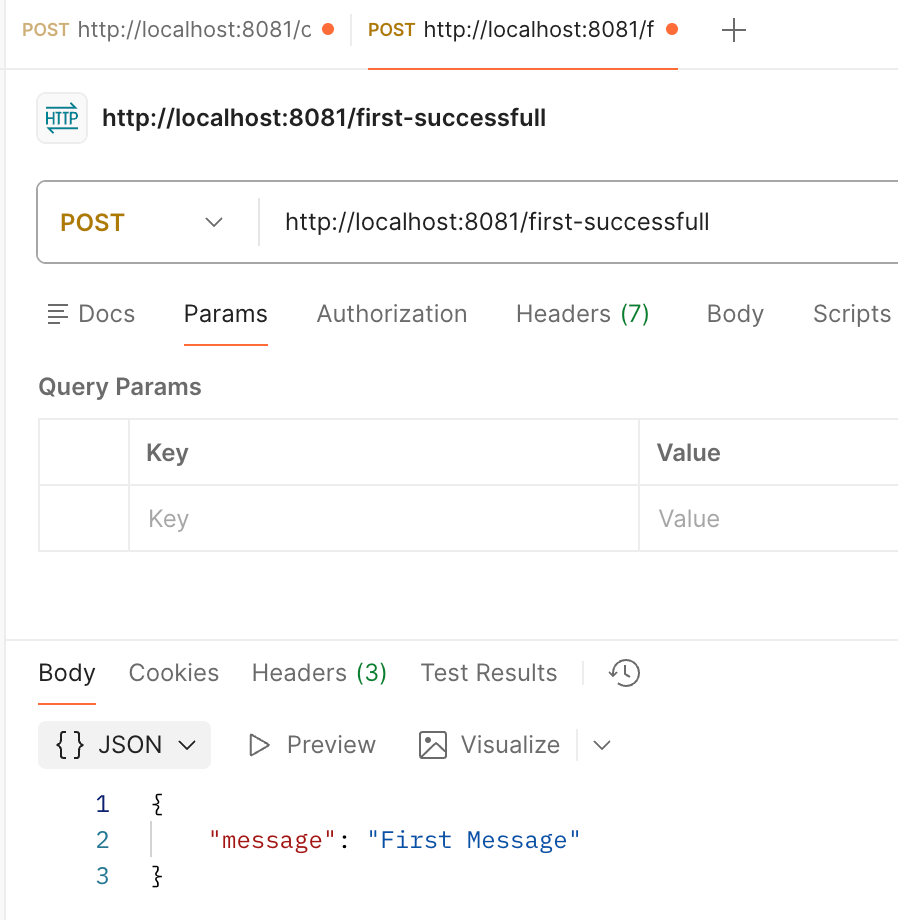
Here we are writing the payload as First Message so in postmen we will get “message”:”First Message” as response message.
- Place another Transform Message component inside the First Successful Router in the same level of the previous Transform Message
- Set the payload to return a JSON message like below.
%dw 2.0 output application/json --- { "message":"Second Message" } - Save all the changes.
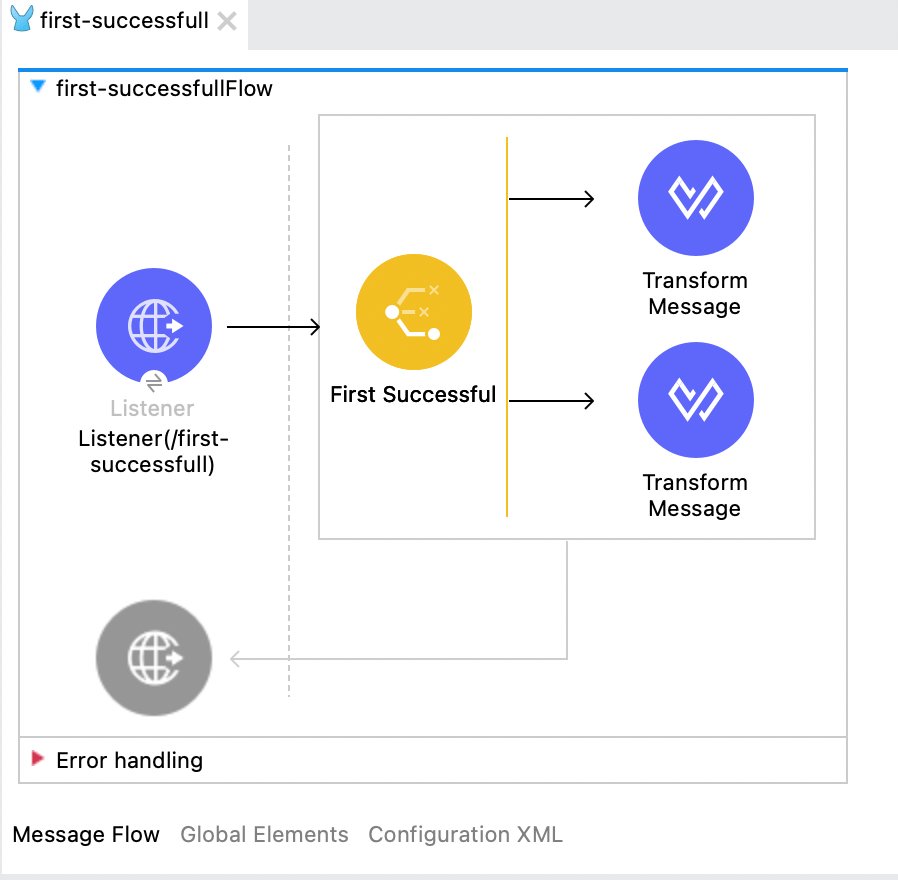
Once the code is developed your Mule flow should look like below.
If you are still stuck in any issue then import below xml into your choice-router mule configuration file.
<?xml version="1.0" encoding="UTF-8"?>

<mule xmlns:ee="http://www.mulesoft.org/schema/mule/ee/core" xmlns:wsc="http://www.mulesoft.org/schema/mule/wsc"
	xmlns:http="http://www.mulesoft.org/schema/mule/http"
	xmlns="http://www.mulesoft.org/schema/mule/core" xmlns:doc="http://www.mulesoft.org/schema/mule/documentation" xmlns:xsi="http://www.w3.org/2001/XMLSchema-instance" xsi:schemaLocation="http://www.mulesoft.org/schema/mule/core http://www.mulesoft.org/schema/mule/core/current/mule.xsd
http://www.mulesoft.org/schema/mule/http http://www.mulesoft.org/schema/mule/http/current/mule-http.xsd
http://www.mulesoft.org/schema/mule/wsc http://www.mulesoft.org/schema/mule/wsc/current/mule-wsc.xsd
http://www.mulesoft.org/schema/mule/ee/core http://www.mulesoft.org/schema/mule/ee/core/current/mule-ee.xsd">
	<flow name="first-successfullFlow" doc:id="cb847b7d-6fb6-4ede-aa10-fc8344c02dc6" >
		<http:listener doc:name="Listener(/first-successfull)" doc:id="06a27325-b549-47bf-bb6b-3b5286accb06" config-ref="HTTP_Listener_config" path="/first-successfull"/>
		<first-successful doc:name="First Successful" doc:id="c57ef611-5788-4701-a697-557a8b2d72ab" >
			<route >
				<ee:transform doc:name="Transform Message" doc:id="d549b697-4147-45cc-b171-119dcf003020" >
					<ee:message >
						<ee:set-payload ><![CDATA[%dw 2.0
output application/json
---
{
	"message":"First Message"
	//"message":10 / 0
}]]></ee:set-payload>
					</ee:message>
				</ee:transform>
			</route>
			<route >
				<ee:transform doc:name="Transform Message" doc:id="6993480f-4879-49ee-880d-3777563959b1" >
					<ee:message >
						<ee:set-payload ><![CDATA[%dw 2.0
output application/json
---
{
	"message":"Second Message"
}]]></ee:set-payload>
					</ee:message>
				</ee:transform>
			</route>
		</first-successful>
	</flow>
</mule>
The intention here is to showcase how the First Successful works in Mule. This flow control executes its routes from top to bottom and stops as soon as one route completes successfully. If a route fails due to any error, Mule automatically moves to the next route and tries to execute it.
This behavior is similar to invoking an API with a failover mechanism. If the primary API call fails for any reason, Mule invokes the secondary (failover) API. If all configured routes fail, the Mule flow ends with a failure.
In the current flow, the first route returns the payload"message": "First Message", so the flow succeeds immediately and the second route is not executed.
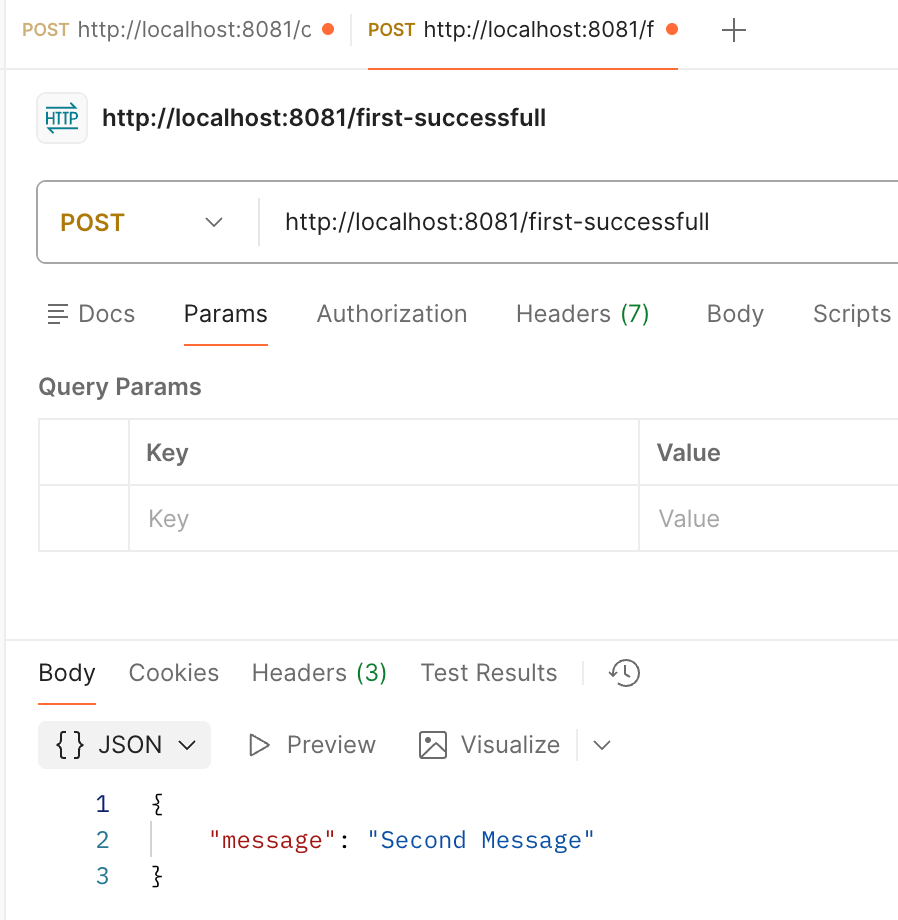
To demonstrate the failover behavior, we intentionally introduce an error in the first route by enabling the line"message": 10 / 0.
Since dividing a number by zero causes a runtime error, the first route fails. Mule then moves to the second route, which executes successfully and returns the response"message": "Second Message".
This clearly demonstrates how the First Successful Router selects the first successful execution path and provides automatic failover handling.
Testing :
Run the Mule configuration file. Once it is deployed, invoke the endpoint http://localhost:8081/first-successfull . Now the first route should be successful and the same will be populated as response in the postman request.
Now update the first route Transform Message so that the first route will fail and the control will move to the second route Transform Message.
%dw 2.0
output application/json
---
{
	//"message":"First Message"
	"message":10 / 0
} 
Scatter-Gather Implementation
The Scatter-Gather sends a copy of the same message to multiple routes in parallel and waits for the response from all routes before continuing. Once all routes complete successfully, Mule gathers the responses into a single message.
If any one of the routes fails with an error, the entire Scatter-Gather component fails and the Mule flow ends in an error, unless the error is explicitly handled within that route.
When a Scatter-Gather finishes executing, Mule does not return a single payload. Instead, it collects the response from each route and wraps them together in one structured object. You can think of the gathered response as a list of route results.
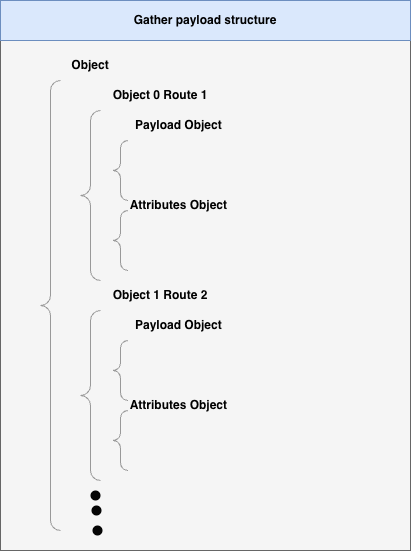
How to read this structure
The top-level object represents the final gathered result.
Inside it, each route execution becomes a separate object:
Object 0 → Response from Route 1
Object 1 → Response from Route 2
And so on…
Each route response contains two parts:
Payload Object
This holds the actual data returned by that route.
Example: API response, transformed JSON, database result.
Attributes Object
This holds metadata related to that route execution.
Example: HTTP status code, headers, or connector-specific attributes.
Now let’s implement it to see the result :
- Create a new mule configuration flow and name it
scatter-gather. - Drag an HTTP Listener component into the flow.
- Set the listener path to
/scatter-gather. - Create or select an HTTP Listener configuration with host
0.0.0.0and port8081. - Drag a Scatter-Gather router after the HTTP Listener.
- Place a Transform Message component inside the router as first route.
- Set the payload to return the employees JSON using DataWeave like below.
%dw 2.0 output application/json --- { "employees": [ { "id": 101, "name": "Amit", "department": "IT", "location": "Bangalore" }, { "id": 102, "name": "Rohit", "department": "HR", "location": "Pune" } ] } - Place another Transform Message component inside the router as second route.
- Set the payload to return the departments JSON using DataWeave like below.
%dw 2.0 output application/json --- { "departments": [ { "departmentId": "D001", "departmentName": "IT", "location": "Bangalore" }, { "departmentId": "D002", "departmentName": "HR", "location": "Pune" } ] } - Drag a Transform Message component after the Scatter-Gather router.
- Set the output type to
application/json. - Set the payload to
payloadto return the gathered response as-is like below.
%dw 2.0 output application/json --- payload - Save all changes.
- Run the project as a Mule Application.
Once the code is developed your Mule flow should look like below.
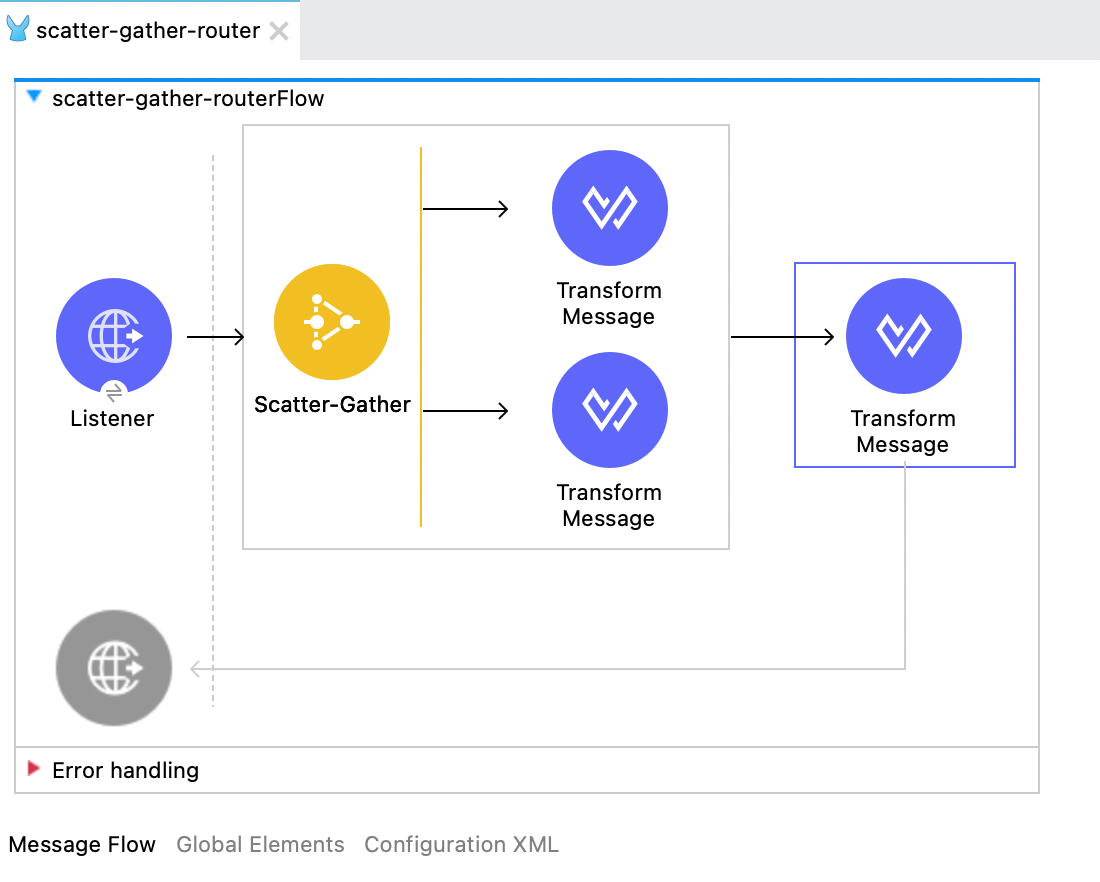
If you are still stuck in any issue then import below xml into your mule configuration file.
<?xml version="1.0" encoding="UTF-8"?>

<mule xmlns:ee="http://www.mulesoft.org/schema/mule/ee/core" xmlns:http="http://www.mulesoft.org/schema/mule/http"
	xmlns="http://www.mulesoft.org/schema/mule/core"
	xmlns:doc="http://www.mulesoft.org/schema/mule/documentation" xmlns:xsi="http://www.w3.org/2001/XMLSchema-instance" xsi:schemaLocation="http://www.mulesoft.org/schema/mule/core http://www.mulesoft.org/schema/mule/core/current/mule.xsd
http://www.mulesoft.org/schema/mule/http http://www.mulesoft.org/schema/mule/http/current/mule-http.xsd
http://www.mulesoft.org/schema/mule/ee/core http://www.mulesoft.org/schema/mule/ee/core/current/mule-ee.xsd">
	<flow name="scatter-gather-routerFlow" doc:id="adcac8ce-b929-4dd6-89ff-bcb3302e6f12" >
		<http:listener doc:name="Listener" doc:id="a9bffbfe-93ad-4a7a-b8ba-bd2ac7ea1015" config-ref="HTTP_Listener_config" path="/scatter-gather"/>
		<scatter-gather doc:name="Scatter-Gather" doc:id="a3dd9558-43ef-40e8-b969-763dbb244f0b" >
			<route >
				<ee:transform doc:name="Transform Message" doc:id="4fec32ae-7640-4276-b378-cf25ece04984" >
					<ee:message >
						<ee:set-payload ><![CDATA[%dw 2.0
output application/json
---
{
  "employees": [
    {
      "id": 101,
      "name": "Amit",
      "department": "IT",
      "location": "Bangalore"
    },
    {
      "id": 102,
      "name": "Rohit",
      "department": "HR",
      "location": "Pune"
    }
  ]
}]]></ee:set-payload>
					</ee:message>
				</ee:transform>
			</route>
			<route >
				<ee:transform doc:name="Transform Message" doc:id="abb21e82-5652-4343-ba02-288893a28ca7" >
					<ee:message >
						<ee:set-payload ><![CDATA[%dw 2.0
output application/json
---
{
  "departments": [
    {
      "departmentId": "D001",
      "departmentName": "IT",
      "location": "Bangalore"
    },
    {
      "departmentId": "D002",
      "departmentName": "HR",
      "location": "Pune"
    }
  ]
}

]]></ee:set-payload>
					</ee:message>
				</ee:transform>
			</route>
		</scatter-gather>
		<ee:transform doc:name="Transform Message" doc:id="04d27501-3700-4274-93c4-81bdd8d867e1" >
			<ee:message >
				<ee:set-payload ><![CDATA[%dw 2.0
output application/json
---
payload]]></ee:set-payload>
			</ee:message>
		</ee:transform>
	</flow>
</mule>
In this demo, we have hard-coded sample JSON responses in each route. In a real project, these routes can be replaced with API calls, database operations, or any other processing steps, depending on the actual business requirement and delivery mechanism.
Now run your Mule project and invoke the endpointhttp://localhost:8081/scatter-gather,you will see the response returned as a collection of objects, where each object represents one route execution, containing both the payload and the corresponding attributes.
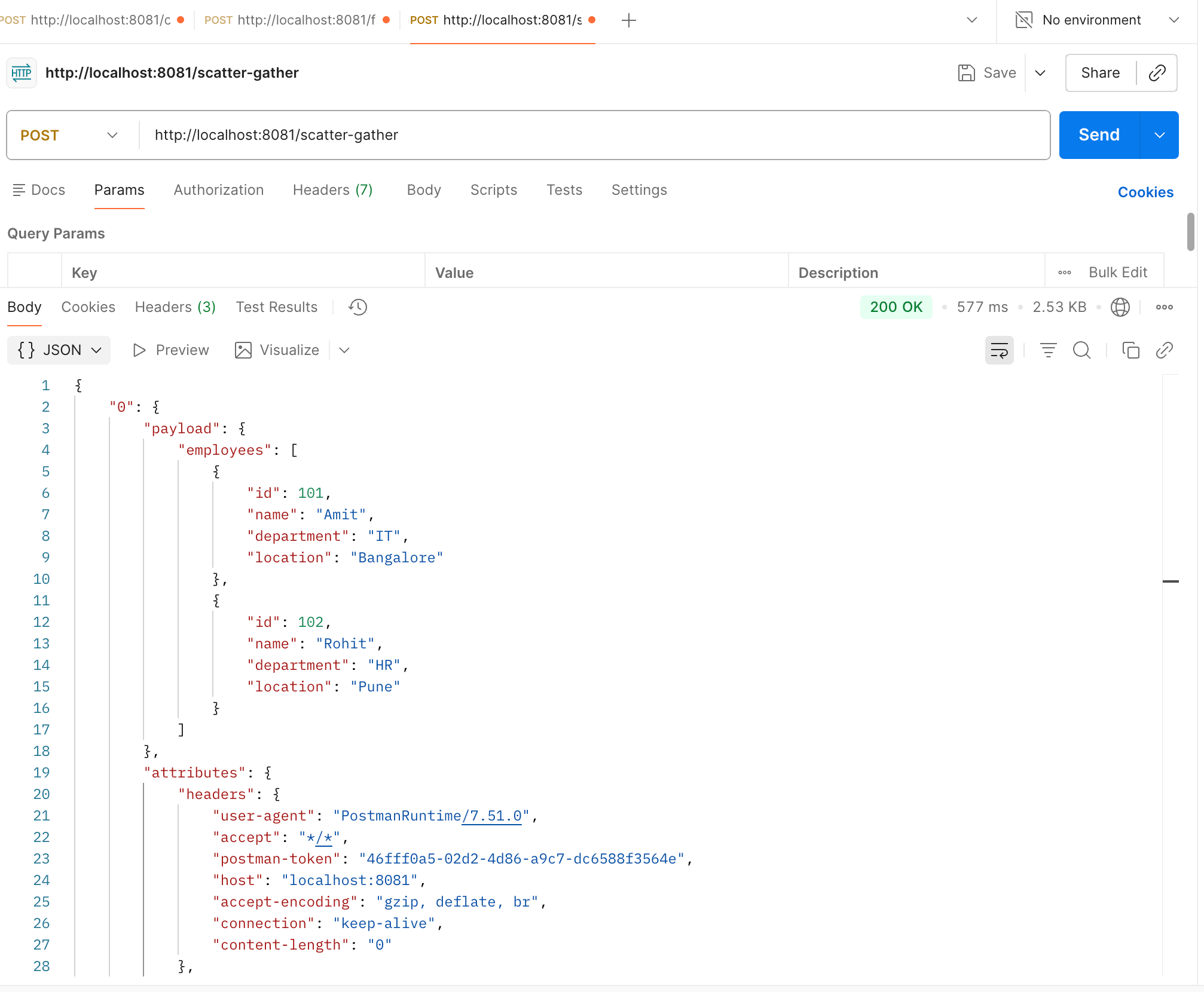
Response :
{
    "0": {
        "payload": {
            "employees": [
                {
                    "id": 101,
                    "name": "Amit",
                    "department": "IT",
                    "location": "Bangalore"
                },
                {
                    "id": 102,
                    "name": "Rohit",
                    "department": "HR",
                    "location": "Pune"
                }
            ]
        },
        "attributes": {
            "headers": {
                "user-agent": "PostmanRuntime/7.51.0",
                "accept": "*/*",
                "postman-token": "46fff0a5-02d2-4d86-a9c7-dc6588f3564e",
                "host": "localhost:8081",
                "accept-encoding": "gzip, deflate, br",
                "connection": "keep-alive",
                "content-length": "0"
            },
            "clientCertificate": null,
            "method": "POST",
            "scheme": "http",
            "queryParams": {},
            "requestUri": "/scatter-gather",
            "queryString": "",
            "version": "HTTP/1.1",
            "maskedRequestPath": null,
            "listenerPath": "/scatter-gather",
            "relativePath": "/scatter-gather",
            "localAddress": "/127.0.0.1:8081",
            "uriParams": {},
            "rawRequestUri": "/scatter-gather",
            "rawRequestPath": "/scatter-gather",
            "remoteAddress": "/127.0.0.1:59182",
            "requestPath": "/scatter-gather"
        }
    },
    "1": {
        "payload": {
            "departments": [
                {
                    "departmentId": "D001",
                    "departmentName": "IT",
                    "location": "Bangalore"
                },
                {
                    "departmentId": "D002",
                    "departmentName": "HR",
                    "location": "Pune"
                }
            ]
        },
        "attributes": {
            "headers": {
                "user-agent": "PostmanRuntime/7.51.0",
                "accept": "*/*",
                "postman-token": "46fff0a5-02d2-4d86-a9c7-dc6588f3564e",
                "host": "localhost:8081",
                "accept-encoding": "gzip, deflate, br",
                "connection": "keep-alive",
                "content-length": "0"
            },
            "clientCertificate": null,
            "method": "POST",
            "scheme": "http",
            "queryParams": {},
            "requestUri": "/scatter-gather",
            "queryString": "",
            "version": "HTTP/1.1",
            "maskedRequestPath": null,
            "listenerPath": "/scatter-gather",
            "relativePath": "/scatter-gather",
            "localAddress": "/127.0.0.1:8081",
            "uriParams": {},
            "rawRequestUri": "/scatter-gather",
            "rawRequestPath": "/scatter-gather",
            "remoteAddress": "/127.0.0.1:59182",
            "requestPath": "/scatter-gather"
        }
    }
}
Round Robin Implementation
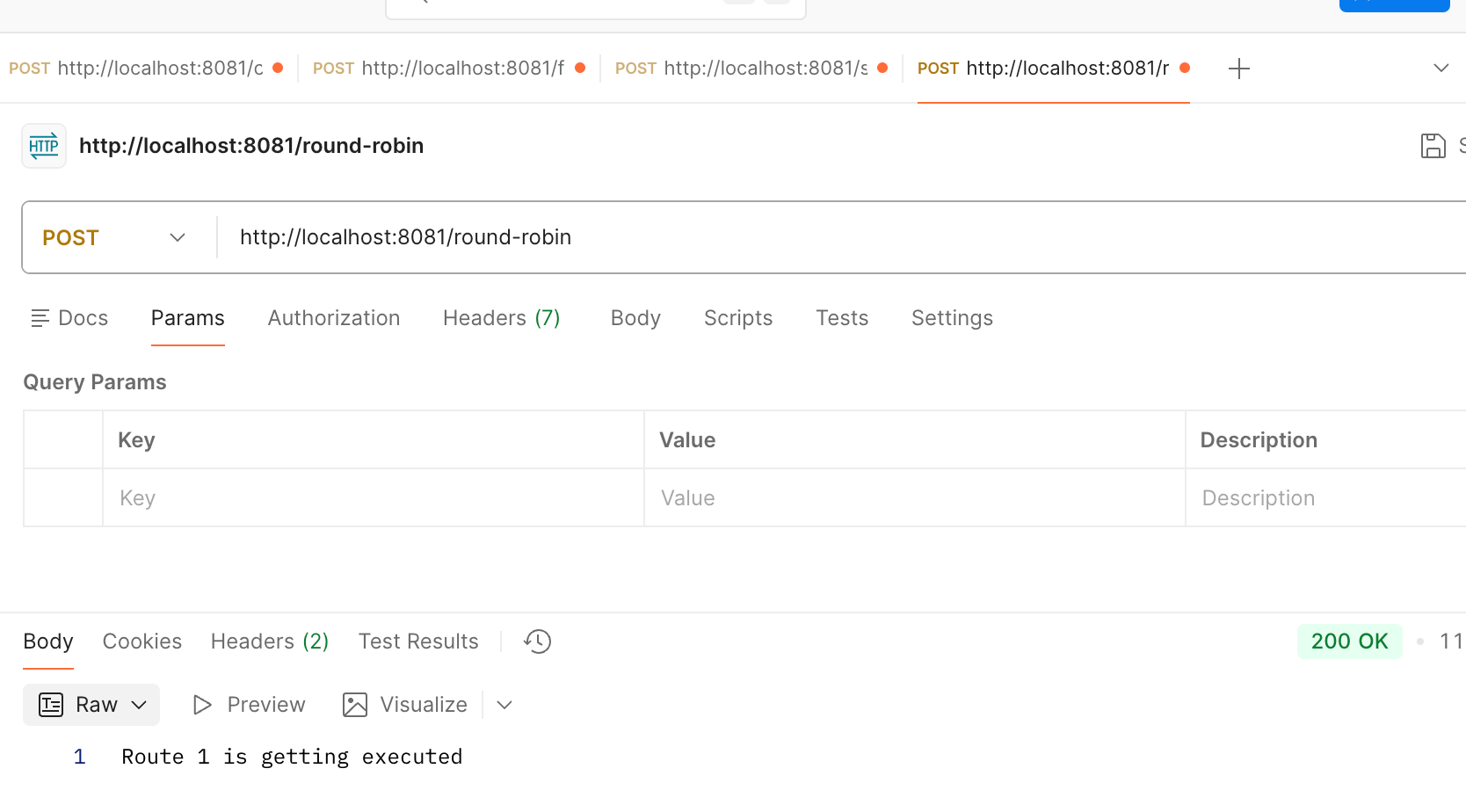
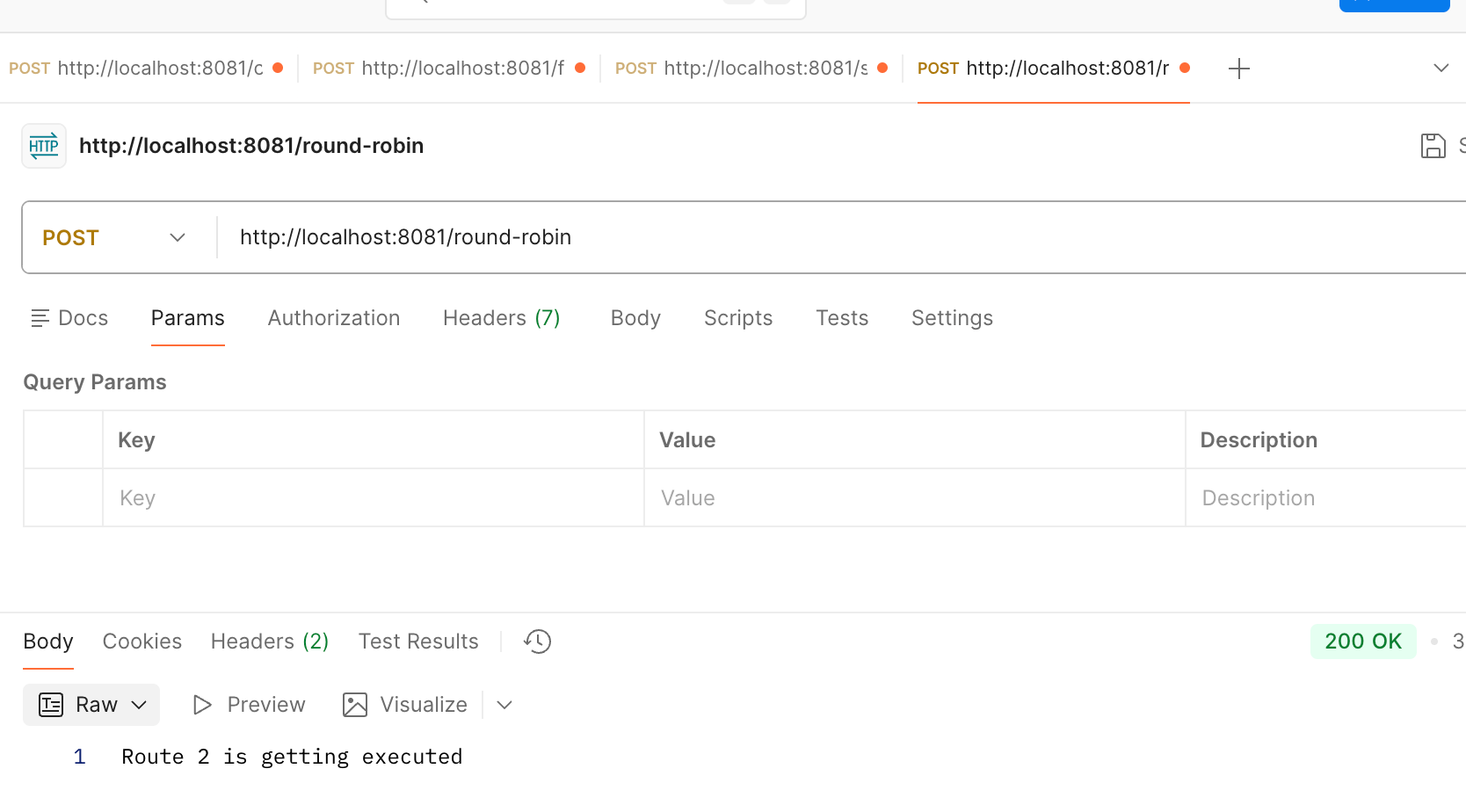
The Round Robin flow control in Mule is used to distribute incoming requests evenly across multiple routes, one request at a time.
Instead of sending every request to the same backend, Round Robin follows a rotation approach:
The first request goes to Route 1
The second request goes to Route 2
The third request goes back to Route 1
This cycle continues for every new request
At any point, only one route is executed per request.
Implementation :
- Add a new Mule configuration XML file and name it as round-robin.
- Drag an HTTP Listener at the start of the flow.
- Configure the HTTP Listener with an HTTP Listener Config and set the path to
/round-robin. - Drag the Round Robin flow control after the HTTP Listener.
- Inside the Round Robin, add a Set Payload component with value
Route 1 is getting executed. - Add a Set Payload inside the Round Robin and set the payload value to
Route 2 is getting executed. - Save the Mule project.
Once the code is developed your Mule flow should look like below.
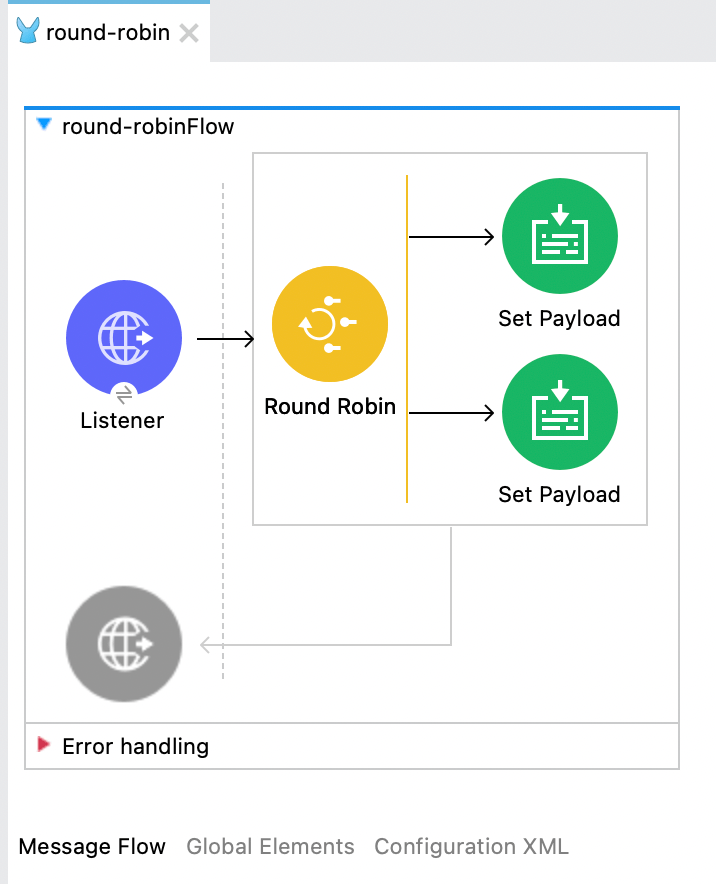
If you are still stuck in any issue then import below xml into your mule configuration file.
<?xml version="1.0" encoding="UTF-8"?>

<mule xmlns:http="http://www.mulesoft.org/schema/mule/http" xmlns="http://www.mulesoft.org/schema/mule/core"
	xmlns:doc="http://www.mulesoft.org/schema/mule/documentation"
	xmlns:xsi="http://www.w3.org/2001/XMLSchema-instance" xsi:schemaLocation="http://www.mulesoft.org/schema/mule/core http://www.mulesoft.org/schema/mule/core/current/mule.xsd
http://www.mulesoft.org/schema/mule/http http://www.mulesoft.org/schema/mule/http/current/mule-http.xsd">
	<flow name="round-robinFlow" doc:id="a4200b0a-ce64-4a57-b0e8-6533f0d565ed" >
		<http:listener doc:name="Listener" doc:id="d216b026-54a5-4609-b174-e96fb6174d2d" config-ref="HTTP_Listener_config" path="/round-robin"/>
		<round-robin doc:name="Round Robin" doc:id="feb3f1b9-6d78-4f03-9a7d-1192caa7018f" >
			<route >
				<set-payload value="Route 1 is getting executed" doc:name="Set Payload" doc:id="02f2814d-31dd-45db-9b2c-b321f1da6d6f" />
			</route>
			<route >
				<set-payload value="Route 2 is getting executed" doc:name="Set Payload" doc:id="08dee930-cef3-4811-8ac2-0c57a344a4b8" />
			</route>
		</round-robin>
	</flow>
</mule>
Now run the mule application and try invoking http://localhost:8081/round-robin, each time you invoke it, you will see the different route is getting selected.